Repair of a business laptop.

Extend the Lifespan of Business Laptops

Repair or replace? Make the right choice for each device.

Replacing a business laptop when it could still last for years after a repair? That’s not always necessary. At the same time, repair isn’t the best choice in every situation either.

With Circlewise’s laptop repair service, we help organizations use their business laptops longer and more effectively. We assess the technical condition of the devices, identify the necessary repairs, and take into account the cost, age, and value of each device.

This way, you'll not only find out whether a laptop can be repaired, but more importantly, whether repairing it is still economically feasible.

Result: a longer service life where it makes sense, and an informed decision to replace where it is more sensible.

Repair or replace?

A faulty battery, a cracked screen, or a broken keyboard doesn't necessarily mean the end of a laptop's life. But just because a repair is technically possible doesn't mean it's always the best investment. That's why we look beyond the problem itself.

For example, we evaluate:

  • the technical condition and age of the device;
  • the necessary repairs and associated costs;
  • the expected remaining useful life;

Based on that, a decision can be made for each device or group of devices: repair or replace?

From Repair to Lifecycle Management

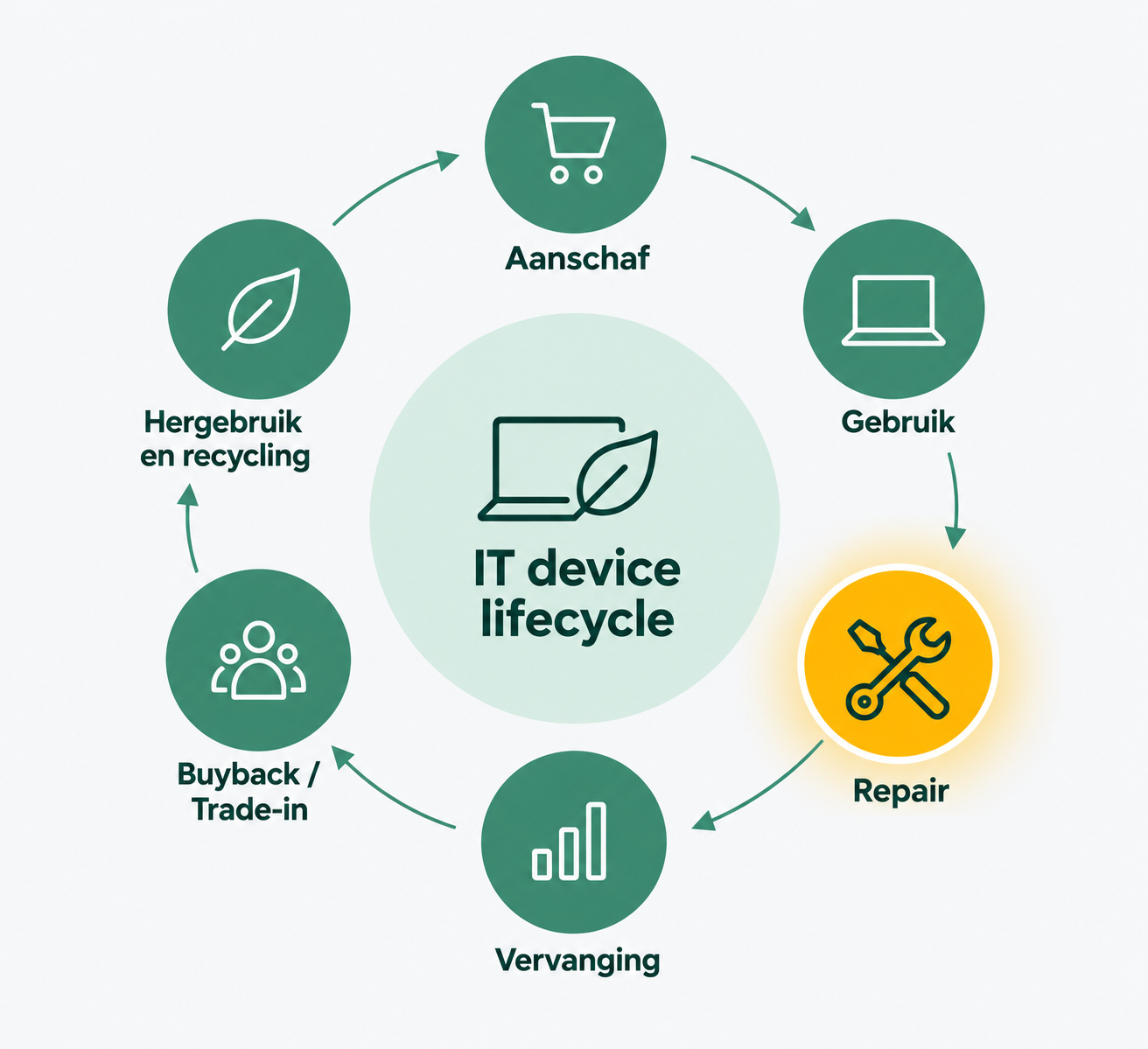
Laptop repair is not an isolated event. It is one decision point within a device’s entire lifecycle.

That is why Circlewise helps organizations look beyond simply fixing a problem.

By linking costs, lifespan, and residual value, we gain a clearer picture of the Total Cost of Ownership (TCO).

For example, keeping a laptop for one more year can be financially appealing if a relatively minor repair is all that’s needed. But when repair costs rise and the residual value drops sharply at the same time, replacing it sooner may actually be more cost-effective.

In this way, Circlewise helps organizations not only use devices for longer, but above all to repair, replace, or phase them out at the right time.

IT device lifecycle, including Purchase, Use, Repair, Replacement, Buyback or Trade-in, and Reuse and Recycling.

The Benefits for Your Organization

Extend the lifespan of laptops

By repairing defects in a targeted manner, suitable laptops can remain in use within the organization for longer.

Avoid Unnecessary Replacement

Not every malfunction requires the purchase of a new device. Repairing it can postpone the need for new purchases.

Make Better TCO Decisions

By weighing repair costs against a device's lifespan, replacement costs, and residual value, you get a more complete picture of the actual costs of a device.

Preserve as much residual value as possible

Repairing something for too long can ultimately reduce its value. That’s why we look at the point at which repairing, replacing, or selling it makes the most financial sense.

Put Circular IT Policies into Practice

By using existing devices for longer, their technical lifespan is better utilized, and premature replacement is prevented.

One partner for the entire lifecycle

From repairs and employee buyback programs to trade-ins, certified data erasure, reuse, and recycling. Circlewise helps with every step along the way.

Which laptops can we repair?

Among other things, we can look at laptops with:

  • a worn-out or defective battery;
  • a damaged screen;
  • a malfunctioning keyboard or touchpad;
  • damaged housing or connections;
  • storage or memory issues;
  • technical malfunctions that require the replacement of parts;
  • overdue technical maintenance.

Which repairs are both possible and cost-effective depends on the type of device, its age, technical condition, and the work required.

Workstation where business laptops are repaired

How Laptop Repairs Work Through Circlewise

01

Intake

We'll discuss the laptop fleet, the number of devices, the types of devices, and the preferred approach.

02

Diagnosis

The devices are inspected, and any defects and necessary repairs are identified.

03

Repair-or-replace recommendation

We assess whether a repair makes sense from both a technical and economic standpoint.

04

Repair

Once approved, suitable devices are repaired and prepared for reuse.

05

Reuse or alternative use

The device is returned to the organization. Is repairing it no longer a viable option? In that case, we can consider employee buyback, trade-in, reuse, or recycling.

Repair or replace?

We'd be happy to assess the situation with you and determine together when repair makes financial and technical sense, and when replacement is the better choice.

Schedule a meeting